Cruise Internet and Connectivity
What Happens If You Leave Roaming On During a Cruise?
Many travelers board a cruise without thinking about their phone’s roaming settings. Once the ship leaves port, your phone may switch from local networks to the ship’s satellite-based maritime network, which is much more expensive.
Even without active use, background tasks like email syncing or app updates can consume data and lead to very high charges. As a result, some passengers return home to unexpectedly large phone bills.
In this guide, we’ll explain what happens when roaming is left on during a cruise, why it’s costly, and how to avoid surprise charges.
Does Your Phone Automatically Connect on a Cruise?
In many cases, yes. If data roaming is enabled on your phone, it may automatically connect to the ship's onboard cellular network once your cruise sails far enough away from land. This often happens without any action on your part, which is why many travelers don't realize they've started using a maritime network until they receive a roaming notification, or a much larger phone bill after returning home.
How Cruise Ship Mobile Networks Work
Most modern cruise ships are equipped with onboard cellular systems that allow passengers to make calls, send text messages, and use mobile data while at sea. Instead of connecting to traditional land-based cell towers, these systems use satellite connections to relay communications between the ship and mobile carriers.
When your ship is close to shore, your phone will usually connect to a local mobile network just as it would during any international trip. However, once the ship moves beyond the range of land-based towers, your device begins searching for another available cellular network.
If roaming is enabled, your phone may automatically connect to the ship's maritime cellular network. Depending on the cruise line and network provider, you may see network names such as:
Cellular at Sea
Maritime Network
901-18
Other maritime operator names depending on the region and provider
These networks are designed specifically for use at sea and are billed differently from standard international roaming.
Read more: How Cruise Ship Internet Works (Satellite Explained)
Why It Happens Automatically
Your smartphone is constantly searching for the best available cellular signal.
As long as roaming is enabled, it doesn't distinguish between a land-based mobile network and a maritime network. It simply connects to an available partner network that your carrier allows.
Once your ship is too far from the coast to receive a signal from terrestrial cell towers, the onboard maritime network often becomes the only available cellular connection. Your phone may switch to it automatically without asking for confirmation.
This automatic connection is convenient if you intentionally want to use mobile service at sea, but it can also result in unexpected roaming charges if you're unaware that your device has switched networks. That's why many experienced cruise travelers recommend turning off data roaming or enabling Airplane Mode before the ship leaves port.
What Happens When Roaming Is Left On?
Leaving roaming enabled during a cruise doesn't necessarily mean you'll receive an enormous phone bill, but it does mean your phone may begin using the ship's maritime network without you realizing it. Because most smartphones are constantly communicating with the internet in the background, charges can start accumulating even if you rarely touch your device.
Your Phone May Start Using Mobile Data
One of the biggest misconceptions is that mobile data is only used when you're actively browsing the web or watching videos. In reality, many apps continue to access the internet automatically throughout the day.
If your phone connects to a maritime network, background data usage may include:
Email syncing
Cloud backups for photos and files
Automatic photo and video uploads
Social media feeds refreshing
App updates
Weather apps downloading forecasts
Maps updating your location
Messaging apps checking for new messages
Calendar and contact synchronization
Individually, these activities use relatively little data. However, because maritime roaming is typically charged at much higher rates than standard mobile data, even small amounts of background usage can become surprisingly expensive.
Many phones also continue using data while they're sitting in your pocket or charging in your cabin unless you've disabled roaming or enabled Airplane Mode.
You May Receive Calls and Text Messages
Roaming charges aren't limited to mobile data. If your phone is connected to the ship's cellular network, voice calls and text messages may also be billed at maritime roaming rates.
Depending on your mobile carrier, you may be charged for:
Incoming phone calls
Outgoing phone calls
Sending SMS messages
Receiving SMS messages (this is often free but varies by carrier)
Voice calls made over maritime networks can be significantly more expensive than calls made on land. Even a short conversation lasting a few minutes may cost much more than you would expect under a normal international roaming plan.
If you need to stay in touch while at sea, internet-based messaging apps such as WhatsApp, iMessage, Messenger, or Signal are often a more affordable option when used over the ship's Wi-Fi or a supported cruise eSIM.
Charges Can Accumulate Quickly
The biggest reason cruise roaming catches travelers by surprise is the cost of maritime networks.
Unlike regular international roaming, which often uses partner mobile networks in the country you're visiting, cruise ships rely on satellite-connected maritime providers that are considerably more expensive to operate.
Because of these higher rates, even a few megabytes of background data usage can result in a noticeable increase on your phone bill. Activities that seem harmless—such as downloading a few emails, refreshing social media, or automatically backing up photos—can become surprisingly costly while you're at sea.
Many travelers don't realize their phone has connected to a maritime network until they receive a notification from their carrier or, more commonly, when they receive their monthly bill after returning home.
How Expensive Can Cruise Roaming Be?
Using your phone at sea is usually much more expensive than on land.
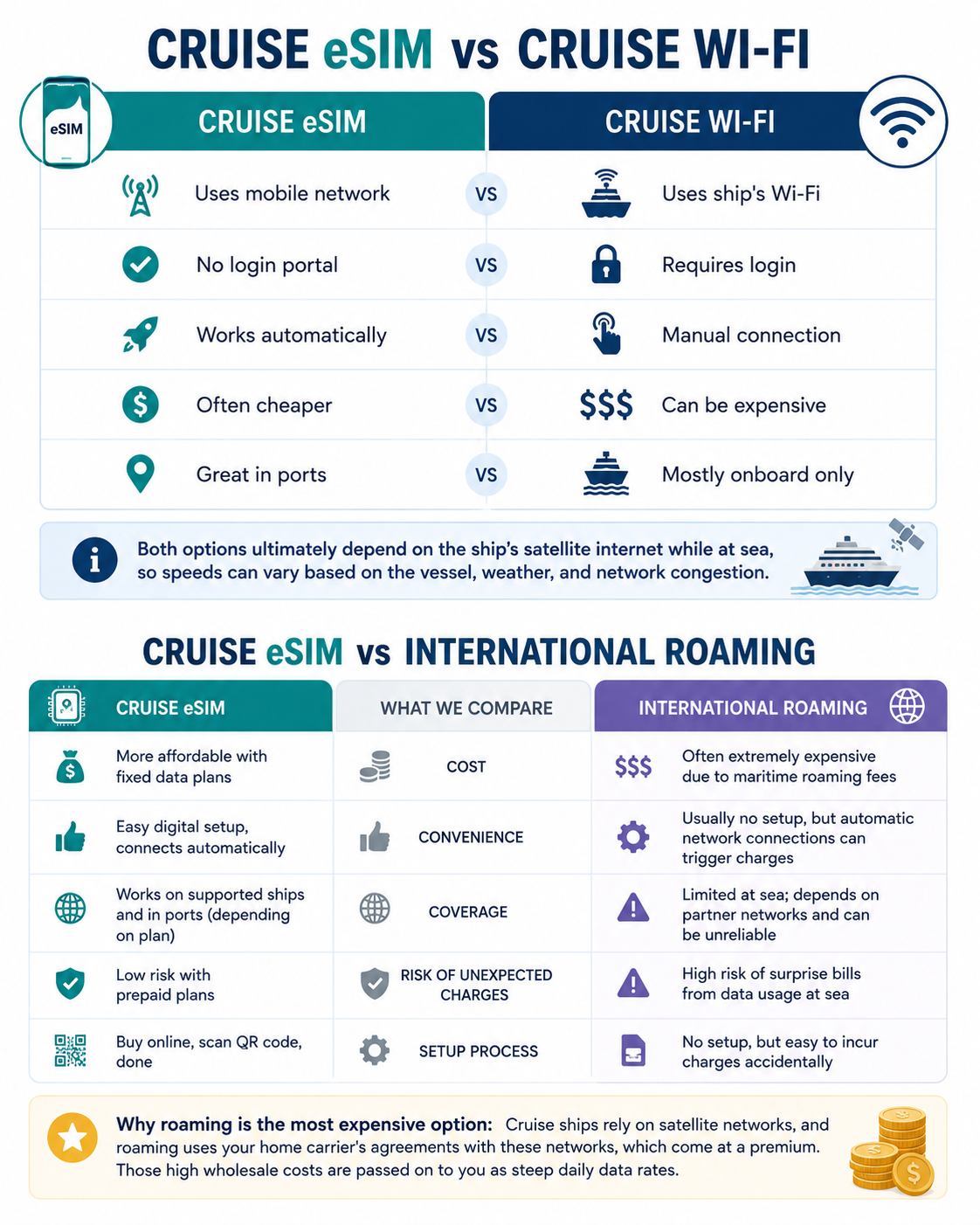
Cruise ships rely on satellite-connected maritime networks, which cost more to operate and often lead to higher charges for passengers.
Typical costs may include:
Mobile data: Charged per MB, not part of your regular plan
Voice calls: Higher per-minute rates
Text messages: Often more expensive than on land
Prices vary by carrier. Some offer cruise packages, while others charge standard maritime rates, meaning passengers on the same ship can pay very different amounts.
Even light usage can add up quickly when data is billed per MB.
If you switch mobile data off entirely, you can avoid data charges altogether. However, your phone may still connect to the maritime network for calls and texts, which can still incur high roaming fees. To fully prevent any charges, it's best to use Airplane Mode, which disables all cellular connections unless you manually turn Wi-Fi back on.
Tip: Check your carrier’s cruise roaming rates before your trip to avoid surprises and compare alternatives like Wi-Fi or eSIMs.
Read more: What Happens If You Leave Roaming On During a Trip?
Can You Accidentally Use Data Without Opening Any Apps?
Yes. Phones often use data in the background, even when you're not actively using them.
Common background activities include:
App updates and syncing
Email and messaging checks
Cloud backups
Weather and location updates
These processes happen automatically, so your phone can use data without you noticing.
To avoid this, turn on Airplane Mode or disable data roaming. You can still use Wi-Fi by turning it back on after enabling Airplane Mode.
How to Prevent Unexpected Cruise Roaming Charges
Avoiding expensive cruise roaming charges is easier than you might think. With a few simple settings and a bit of preparation, you can stay connected without worrying about a large phone bill after your trip.
Option 1: Turn Off Data Roaming
Disabling data roaming before your cruise helps prevent your phone from using mobile data on maritime networks.
Before boarding:
Open your phone’s network settings.
Turn off Data Roaming.
Double-check it stays off.
Note that this won’t stop calls or texts. For full protection, Airplane Mode is a better option.
Option 2: Enable Airplane Mode
Airplane Mode is the safest choice while at sea. It prevents your phone from connecting to maritime networks, avoiding unexpected charges.
You can still turn Wi-Fi back on to use the ship’s internet if you’ve purchased a package. Many travelers keep Airplane Mode on for the entire cruise, turning it off only in port.
Read more: Does Airplane Mode Stop Cruise Charges?
Option 3: Use the Ship’s Wi-Fi
Most cruise ships offer onboard Wi-Fi.
Pros:
Works on most devices
Good for messaging, email, and browsing
No risk of roaming charges
Cons:
Can be expensive
Speeds may vary
Some plans limit streaming or video calls
For light use, Wi-Fi is often cheaper than roaming (but more expensive than cruise eSIM).
Option 4: Use a Cruise eSIM (If Supported)
Cruise eSIMs provide a prepaid data option for supported maritime networks, offering more predictable costs compared to traditional roaming.
Before buying, check compatibility with:
Your cruise line and ship
Your itinerary
Some plans also work in port, making them a convenient all-in-one option.
Read more: How to Stay Connected on Your Cruise with a Cruise eSIM
How to Check If You're Connected to a Maritime Network
It’s not always obvious when your phone switches to a ship’s maritime network, but a few signs can help you spot it before charges add up.
Check the Network Name
Look at your phone’s network name. If you see:
Cellular at Sea
Maritime Network
901-18
or another unfamiliar name, you’re likely on the ship’s network.
Consider Your Location
If you’re far from land, your phone is probably using the ship’s network. Near shore or in port, it should reconnect to a local carrier.
Look for Roaming Alerts
Carriers often send texts when you connect to a maritime network, warning about higher charges. Don’t ignore these.
Check Network Settings
You can also confirm your connection in your phone’s network settings.
To avoid unexpected fees, switch to Airplane Mode if you don’t plan to use the maritime network.
What Happens When the Ship Arrives in Port?
When your ship docks, your phone typically switches from the maritime network to a local carrier.
It may:
Disconnect from the ship’s network
Connect to a local network
Use your eSIM for cruise, local SIM, or roaming plan
This usually happens automatically once you're close to shore.
A regional travel eSIM can be especially useful here, letting you connect across multiple countries without switching SIMs. It often provides better speeds and lower costs than standard roaming.
Combining a cruise eSIM at sea with a regional eSIM in port is one of the easiest and most cost-effective ways to stay connected throughout your trip.
Featured photo by G.isle px. from Pexels